Introduction
Consistency is the foundation of a strong, memorable brand. But for solopreneurs, agencies, and growing e-commerce brands, keeping every social post, visual, and caption aligned with brand guidelines across platforms can feel overwhelming.
Enter Mavic AI, your AI-powered brand marketing agent. With its Brand Kit Manager feature, Mavic simplifies brand consistency by applying your fonts, colors, tone, and visuals to every content piece, across every channel, without fail.
In this blog, we’ll explore how Mavic helps you establish and maintain brand consistency effortlessly while saving you hours of manual work.
Top 3 Common Queries
- How can I maintain consistent branding across all social media platforms?
- Is there a way to automate brand elements like logos, fonts, and colors in content creation?
- What tools help ensure my brand guidelines are followed in every post?
Why Maintaining Brand Consistency Is So Difficult for Small Businesses
Every business owner knows how important it is to “stay on brand,” but in reality, brand consistency is easier said than done. Especially when you’re juggling content, platforms, clients, and daily operations.
Here’s what usually gets in the way:
1. Where Did I Save That Logo?
Your brand assets like logos, fonts, hex codes, templates are often scattered across folders, emails, or even old drives. Without a centralized hub, it’s frustrating and time-consuming to find what you need, every single time.
2. This Doesn’t Sound Like Us
Whether you’re writing content yourself or outsourcing to freelancers, keeping your brand voice consistent is hard. One post might sound friendly, another too formal. That inconsistency confuses your audience and weakens your identity.
3. We Don’t Have Time to Check Everything
You want to follow your brand guidelines, but checking every design and caption manually isn’t scalable. Reviewing for tone, style, image use, and formatting takes time you don’t have.
4. Each Platform Needs a Different Version
Instagram, LinkedIn, Twitter and Facebook – they all need different formats, tones, and visuals. Repurposing content while keeping it aligned with your brand identity takes extra effort and can easily lead to off-brand posts.
5. Everyone’s Using Different Tools
Your designer, content writer, and social media manager might all be using different apps or templates. Without a unified system, you end up with fragmented branding and inconsistent user experiences.
How Mavic Simplifies This Entire Process
Mavic’s Brand Kit Manager brings order, automation, and intelligence to brand consistency.
Here’s how:
- AI-Powered Brand Recognition
Mavic learns your brand’s tone, voice, and values so that every piece of content reflects your identity. No manual setup required. - Centralized Brand Assets
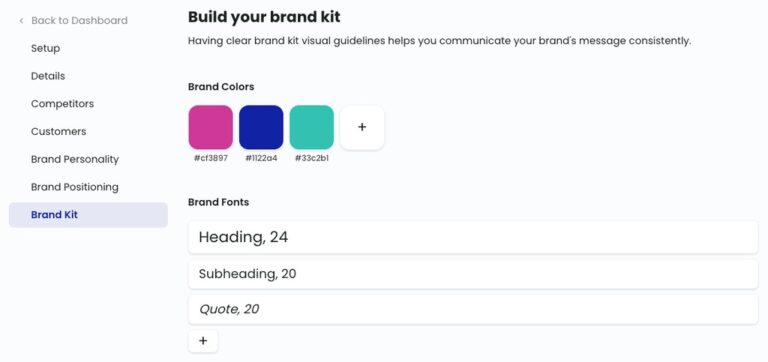
Upload your brand logos, fonts, color palettes, taglines, and design rules once. Mavic applies them across every content type, automatically. - Multi-Channel Format Adaptation
Whether it’s an Instagram carousel, a LinkedIn post, or a tweet, Mavic adjusts the format without compromising brand guidelines. - Dynamic Visual Content Creation
With Mavic’s Image Agent, you can create stunning, scroll-stopping visuals that follow your visual identity. No graphic design experience required. - Template Personalization
Mavic’s smart templates use your brand’s visual system, so you can generate on-brand posts in seconds every time. - Built-In Brand Voice Matching
Whether you’re casual, professional, or quirky, Mavic ensures every caption and blog stays true to your chosen tone.
Step-by-Step Walkthrough – How a Freelancer Uses Mavic to Stay On-Brand
Scenario: Meet Arjun, a freelance digital marketer managing five small business clients across Instagram, LinkedIn, and Twitter.
Step 1: Upload Brand Kits for Each Client
He adds logos, fonts, tone guidelines, and color palettes to Mavic’s Brand Kit Manager for each client.
Step 2: Select Brand Before Creating Content
Before writing a post, Arjun selects the client’s brand. Mavic automatically adjusts tone and visuals accordingly.
Step 3: Generate and Schedule
He uses Mavic’s AI to generate platform-optimized captions, visuals, carousels and all perfectly aligned with each brand. Then he schedules them in the built-in content calendar.
Step 4: Review and Share
Mavic ensures every asset meets the client’s brand rules. Arjun just does a quick review and hits “publish.”
Result: Five clients, five completely different voices are managed effortlessly from one mavic’s dashboard.
Key Benefits of Using Mavic’s Brand Kit Manager for Consistent, Scalable Marketing
Maintaining a polished, professional brand across all your marketing touchpoints shouldn’t be overwhelming. With Mavic AI’s Brand Kit Manager, you don’t just organize your brand assets, you operationalize them as well. Here’s how it transforms your workflow:
1. Consistency Without Micromanagement
From your logo to your color palette, every piece of content generated through Mavic automatically adheres to your predefined brand guidelines. No more mismatched visuals, off-tone messages, or inconsistent fonts.
2. Save Hours Every Week With Automation
Set up your brand kit once, then mavic applies it across campaigns, documents, and posts. Whether it’s a carousel for Instagram or a blog post for LinkedIn, the right colors, fonts, and tone are always in place without manual formatting.
3. Reduce Human Errors and Guesswork
AI-enforced brand compliance means your brand elements aren’t left to interpretation. Even when multiple people are contributing freelancers, agencies, or in-house teams your content remains error-free and brand-true.
4. Ready-to-Publish Content for Every Channel
Mavic automatically adapts your content to fit different social media platforms, adjusting formats, tone, and design specs without sacrificing brand consistency. Whether it’s a tweet or a LinkedIn banner, it’s platform-ready.
5. Simplified Collaboration Across Teams
Working with collaborators? Mavic’s centralized brand kit ensures everyone from your designer to your social media assistant is using the same brand elements, no matter where they’re located or what tool they’re using.
6. Confidently Scale to Multiple Brands
Managing multiple clients or products? Mavic allows you to create and maintain separate brand kits, so you can scale your output without cross-contaminating your brand identities or lowering quality.
Final Thoughts and What to Do Next
Brand consistency is more than just aesthetics, it’s the foundation of trust, customer recognition, and long-term brand equity. When your visuals, tone, and messaging align across every channel, your audience notices and remembers.
But maintaining that alignment while scaling content across platforms and teams? That’s where most businesses stumble.
Mavic’s Brand Kit Manager removes the friction.
It gives you one centralized hub to define your brand identity and ensures every post, campaign, and asset reflects it automatically.
- No more scattered logos or rogue color codes
- No more “off-brand” social posts from freelancers
- No more tedious content rewrites to fix tone or voice
The result? Professional-grade content, delivered faster, and always on-brand whether you’re a solo creator or managing multiple brands across channels.
Ready to take control of your brand consistency and scale with confidence?
Start building your brand kit in Mavic today and experience the difference in your content quality and workflow speed.
Ready to build a consistent, recognizable brand?
Explore Mavic’s Brand Kit Features or Start Your Free Trial Today