In the dynamic world of digital marketing, staying organized and maintaining a consistent presence on social media is crucial for engaging your audience and building a strong brand. A social media content calendar is a strategic asset that helps you plan, schedule, and manage your posts across various platforms. By planning your content in advance, you can align your messaging with your brand’s objectives, engage your audience effectively, and keep your social media channels vibrant and active.
What is a Social Media Calendar?
A social media calendar is a planning document used to schedule and organize upcoming content across various social media platforms. It typically includes details such as the platform, date and time of posting, hashtags, handles, links, visual assets, and captions. This calendar serves as a roadmap for your social media strategy, ensuring that your content is timely, relevant, and engaging.
Why Your Business Needs a Social Media Calendar
Enhances Organization Growth:
- Planning Work: By mapping out your content in advance, you can ensure a steady flow of posts without last-minute scrambles.
- Visual Overview: Seeing your entire year’s worth of planned content can help you identify busy periods and quieter times, aiding in better resource management.
- Resource Planning: Allocate your budget and staff time more effectively by knowing what content needs to be created and when.
Improves Consistency:
- Seasonal Relevance: Posting content that aligns with seasons, holidays, or current events keeps your brand relevant and engaging.
- Algorithm Favor: Consistent posting helps in maintaining visibility, as social media algorithms favor regular activity.
Facilitates Collaboration:
- Team Coordination: A shared calendar allows team members to stay on the same page, ensuring cohesive messaging and tone of voice.
- External Collaboration: Collaborate seamlessly with freelancers or agencies by giving them access to your content schedule.
Saves Time:
- Efficient Posting: Planning content in advance reduces the daily burden of coming up with new posts.
- Evergreen Content: Revisit and repurpose successful past content to save time and resources.
Data-Driven Strategy:
- Content Gaps: Identify themes or topics you may be missing by reviewing your planned content.
- Performance Analysis: Use past performance data to inspire future content ideas and improve strategy.
Key Components of an Effective Social Media Calendar
Content Planning:
- Variety: Ensure a mix of content types (e.g., blog posts, videos, infographics) to keep your audience engaged.
- Audience Targeting: Tailor content to meet the interests and needs of your target audience.
Scheduling:
- Automation: Utilize scheduling tools to automate your posts, ensuring they go live at optimal times.
- Consistency: Maintain a regular posting schedule to build and retain your audience.
Tracking and Analytics:
- Performance Metrics: Monitor engagement metrics to understand what types of content resonate most with your audience.
- Adjust Strategy: Use insights from analytics to refine your content strategy continuously.
How It’s Easier to Create a Content Calendar with Mavic
Mavic offers a comprehensive suite of tools designed to streamline the creation and management of your social media content calendar in minutes. Here’s how you can leverage Mavic to create an effective content calendar:
Planning Your Content Calendar
1. Public Holidays and Social Holidays: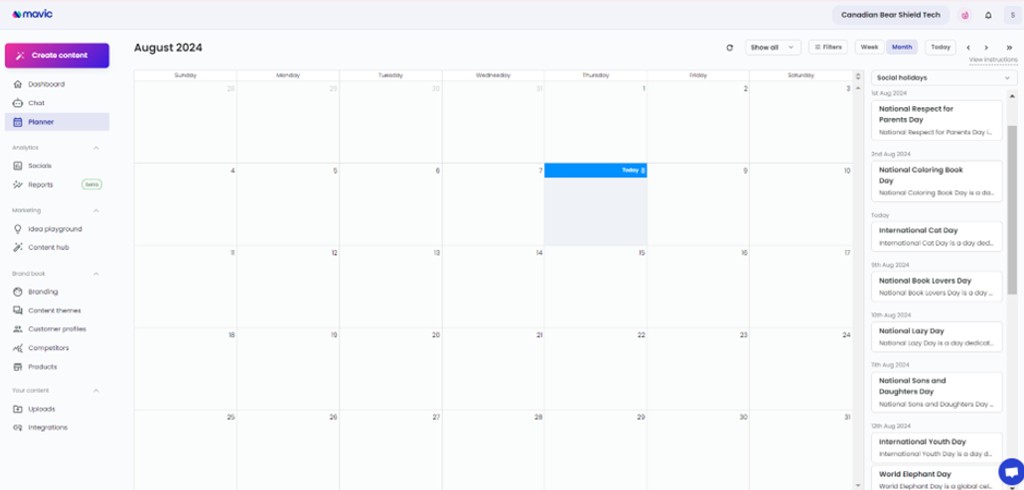
Mavic provides an integrated calendar feature that includes public holidays and social holidays, allowing you to plan content around key dates. This ensures your posts are timely and relevant.
2. Adding Notes and Transforming Notes to Ideas: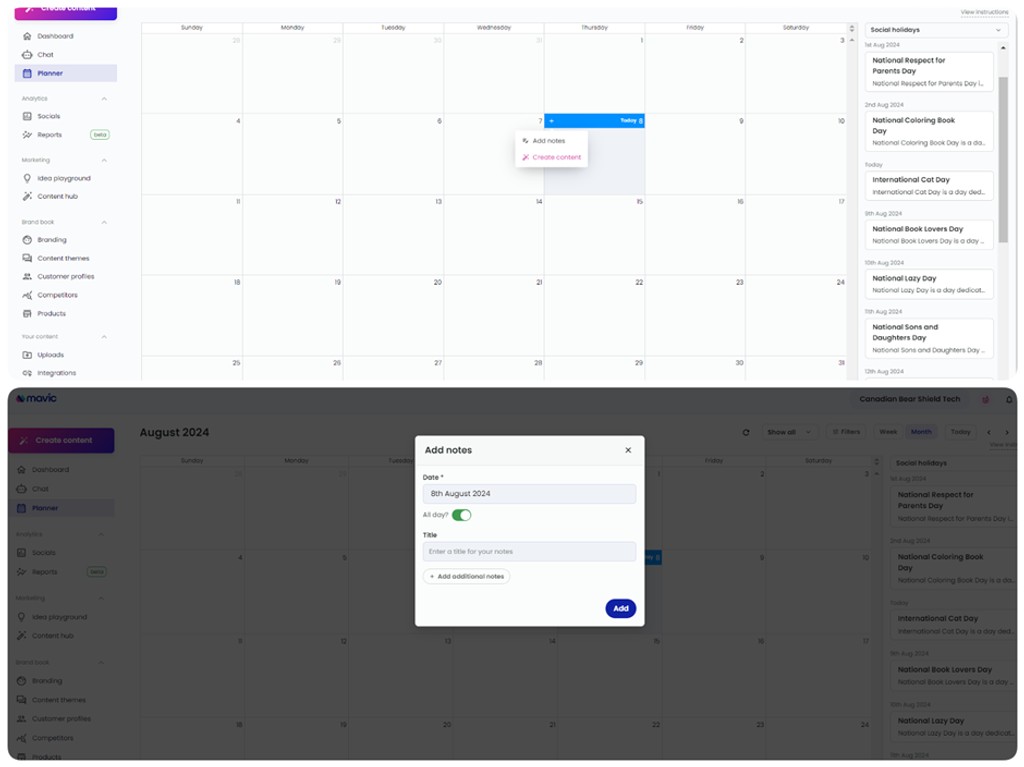
Use Mavic to add notes for each key date, brainstorming content ideas and themes. These notes can be easily transformed into actionable content ideas in minutes.
Building and Scheduling Your Content
3. Drag Saved Ideas onto Calendar:
With Mavic, you can drag and drop saved ideas directly onto your calendar. This visual approach simplifies content planning and ensures a balanced mix of content types.
4. Reschedule Ideas:
Flexibility is key in content planning. Mavic allows you to reschedule posts with a simple drag-and-drop interface, making it easy to adjust your strategy as needed.
5. Transform Ideas to Content and Schedule Posts:
Once your ideas are in place, Mavic helps you transform these ideas into full-fledged content. You can then schedule posts to be published at optimal times.
6. Track Performance:
After your posts are live, Mavic’s analytics tools help you track performance metrics. This data-driven approach allows you to refine your strategy and continuously improve your social media efforts.
Helpful Social Media Tools
1. Mavic:
Mavic is an AI brand marketer that helps a business create their brand strategy in minutes, find customers, create content ideas, transform the ideas to content, and then publish them onto social media channels.
2. Sprout Social:
Sprout Social helps you understand your audience and engage your online community through content planning and demographic listening features, as well as an analytical tool to help improve your social media presence. Its focus is on ROI and optimization of your social content for long-term added value.
3. HootSuite:
One of the most popular content scheduling programs, Hootsuite offers a robust platform for organizing content. A Google Chrome extension that lets you schedule content as you discover it on the internet is a feature unique to this tool.
4. Zoho Social:
Zoho Social allows you to create a publishing calendar with drag-and-drop options so you can easily reschedule and manage your content pipeline. They also offer a collaborative tool so you can share your content with your team or clients.
5. Buffer:
Buffer offers a simple way to schedule posts across various social media platforms. It also provides analytics to help you track the performance of your content and make informed decisions.
6. Later:
Later is particularly popular for Instagram scheduling but supports other platforms as well. It offers a visual content calendar, allowing you to drag and drop posts into your schedule easily.
Conclusion
A social media calendar is an indispensable tool for any business looking to thrive in the digital marketing arena. It helps you stay organized, ensures consistent posting, facilitates collaboration, and allows for data-driven decision-making. By incorporating key dates and utilizing powerful scheduling tools like Mavic, you can streamline your social media efforts and create a more effective and engaging presence online.