Instagram is more crowded than ever. With billions of photos, Reels and Stories posted each month, even excellent content can vanish unless your account settings and metadata are dialed in. The good news: you don’t need ads or algorithm-stalking to win. Master these 6 Instagram settings and you’ll unlock a big, consistent reach boost — fast. Bonus: I’ll show how mavic.ai/ (your AI Brand Marketer) can automate every one of them so you never forget a toggle or caption again.
Why these Instagram settings matter in 2026
Instagram’s discovery engine now heavily favors three things:
- Content quality — crisp, native-resolution images and vertical video format.
- Discoverability — searchable metadata (captions, ALT text, keywords).
- Cross-platform signals — engagement carried over from Facebook & Threads.
If your posts are high quality but the settings are wrong, the algorithm simply deprioritizes them. Nail the isntagram settings below and watch your content surface more often — in feed, Explore, and search.
1.Upload at the Highest Quality

Settings → Account → Data Usage → Upload at Highest Quality → ON
Make sure Use Less Mobile Data is OFF.

Why it matters
Instagram downranks blurry/compressed assets. High-quality uploads keep visuals crisp on Explore and Reels — that increases watch time, saves, and shares (the three things that drive viral reach).
Creator growth hack
Shoot Reels in 4K or 1080×1920 (9:16). Export with high bitrate and upload from Wi-Fi. Tiny visual differences mean longer watch time and repeat views.
2) Allow Public Posts to Appear in Search Engine Results

How to enable
Settings → Account Privacy → Allow Public Photos & Videos to Appear in Search Engine Results → ON

Why it matters
This lets Google (and other search engines) index your public posts. That means your Instagram images and Reels can pull organic traffic from outside Instagram — huge for niche keywords and evergreen content.
Creator growth hack
Combine this with keyword-rich captions and descriptive ALT text so your Reels and images can show up for relevant Google image/video queries.
3) Show Account Suggestions on Profiles

How to enable
Edit Profile → Show Account Suggestions on Profiles → ON

Why it matters
When the toggle is on, Instagram recommends your profile to users who follow similar accounts — a free boost to warm, relevant audiences.
Pro tip
Use a concise, keyword-rich bio (one line that states what you do + who it’s for). When suggested to a similar follower, a clean bio improves the follow conversion.
4) Switch to a Professional Account

How to enable
Settings → Account Type and Tools → Switch to a Professional Account

Why it matters
Professional accounts unlock analytics that matter: follower growth trends, reach, saves, Reel completion rates, and audience demos. In 2026 the algorithm increasingly rewards accounts that meet user demand metrics you can only track with a professional profile.
Creator tip
Pick the correct category (Content Creator, Educator, Coach, etc.) — it helps Instagram route your account to the right people.
5) Enable Cross-Posting to Facebook & Threads

How to enable
Settings → Cross-Posting → Toggle Recommend on Facebook and Recommend on Threads ON

Why it matters
Meta treats cross-platform engagement as a signal. Cross-posting can add 20–30% extra reach by amplifying early engagement across apps.
Pro tip
Use a scheduler (or Meta Business Suite) to optimize captions per platform — the same post often needs a slightly different lead-in for Threads vs. Instagram.
6) Optimize Content Preferences & Niche Category

How to enable it
Settings → Content Preferences → Topics You Want to See More Of (adjust)
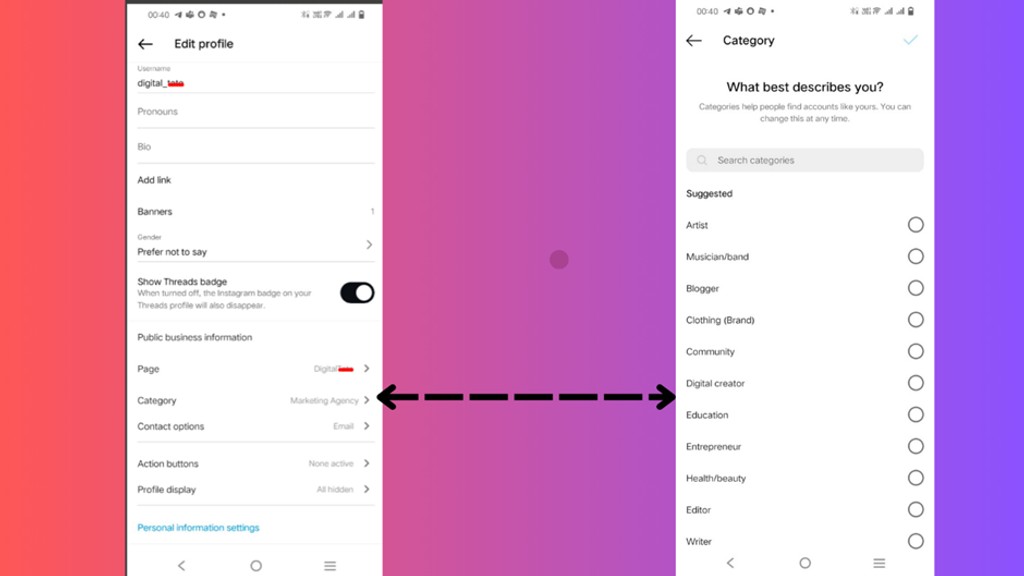
Edit Profile → Choose the most relevant Category for your account
Why it matters
Clear niche signals teach Instagram who should see your posts. The algorithm matches content to the right audience, increasing relevance and engagement.
Growth tip
Refresh categories & content preferences quarterly to match trending angles in your niche (e.g., if short-form tips are trending, lean into it).
Quick wins: Bonus Tips that amplify discoverability
- Use SEO-friendly ALT text: Advanced Settings → Accessibility → Write ALT text with 2–3 target keywords.
- Smart hashtags: 5–7 high-quality tags — mix broad and niche.
- Timing matters: First 30 minutes of engagement shape distribution. Use Insights to post when your crowd is active.
- Content variety: Rotate Reels, carousels, and Stories to satisfy different algorithm signals.
Common mistakes that kill reach
- Uploading low-res assets.
- Skipping ALT text and keyword-rich captions.
- Keeping a generic bio that fails to convert.
- Ignoring analytics from a professional account.
- Not cross-posting within the Meta ecosystem.
Growth hack — let mavic.ai/ handle the heavy lifting (so you never miss a beat)
Toggling 6 Instagram settings every quarter is tedious — and easy to forget when you’re in content mode. mavic.ai/ doesn’t change your Instagram account settings or ping you about toggles. What it does do is remove the real work that comes after those switches: content, creative, formatting, and publishing — all the pieces that actually move the needle.
After a one-time secure connection to your accounts, mavic.ai/ will take care of the execution so every post has the best shot at discovery:
Create on-brand content at scale — turn an idea into multiple caption variations, post copy, and campaign themes that match your voice.
Generate visuals and video assets — produce on-brand images, thumbnails, product mockups, and short videos ready to publish.
Generate SEO-ready assets — ALT text, keyword-rich captions, and optimized hashtag groups are suggested so posts are more discoverable.
Auto-optimize media for platforms — resize, transcode, and format images/videos to platform specs so quality and watch time are preserved.
Schedule & cross-publish — queue posts and publish to Instagram, Facebook, and Threads from a single dashboard with platform-specific tweaks.
Smart recommendations (not nagging) — suggests best posting windows, which format to use (Reel vs carousel vs single image), and A/B caption variants to test.
Adaptive guidance — Mavic updates its content recommendations when platform signals shift so your creative strategy stays current.
Team-safe workflows — roles, approvals, and campaign templates let teams scale without losing brand voice.
Result: more reach, less fiddly configuration. You get polished content, perfectly formatted media, and data-backed posting plans — so you can focus on creating instead of toggling Instagram settings.
Conclusion — play the long game, optimize the details
Winning on Instagram in 2026 isn’t about chasing rumors — it’s about mastering the 6 Instagram settings and signals the platform actually rewards. Turn the six settings above into routine checks and keep producing high-quality content, and focus on building relationships with your audience. Small technical wins compound quickly: better uploads, searchable captions, and cross-platform engagement = more discoverability, faster follower growth, and higher conversions.